Building a Serverless Photo Uploader with AWS Lambda, API Gateway, and S3 (Free-Tier Project)
In today's cloud-first world, serverless applications are transforming how developers build and deploy apps. Instead of managing servers, we focus on writing code and letting AWS handle scaling, availability, and infrastructure.
In this post, I'll walk you through how I built a Serverless Photo Uploader using AWS Lambda, API Gateway, and S3, fully deployed through Terraform.\ This project helped me deeply understand how frontend apps talk to AWS backends and how pre-signed URLs make uploads secure and cost-effective.
Architecture Overview
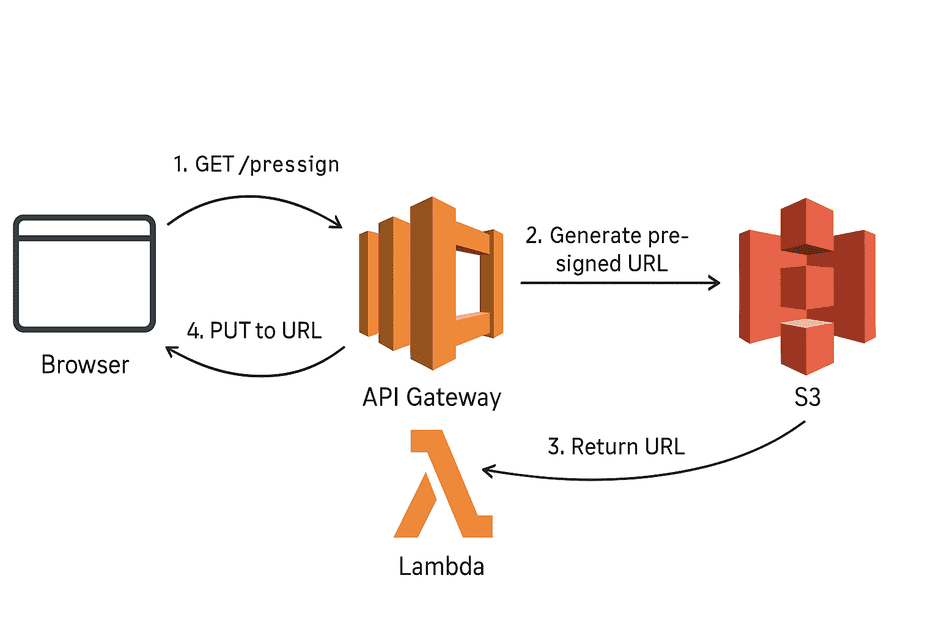
Here's what happens when a user uploads a photo:
-
The browser requests a pre-signed URL from API Gateway (
GET /presign). -
API Gateway triggers a Lambda function.
-
Lambda generates a temporary pre-signed S3 URL (valid for 5 minutes).
-
The browser uses that URL to upload directly to S3 using
PUT.

This eliminates the need for an EC2 server or backend API --- keeping costs close to zero.
Why Use API Gateway?
API Gateway acts as the secure middleman between the browser and Lambda.\ Without it, your Lambda would not have a public endpoint.
It provides: - HTTPS access to Lambda\
- CORS configuration\
- Rate limiting & authorization\
- Integration with CloudWatch for monitoring
With this setup, your frontend can safely communicate with AWS services through one HTTPS URL.
What Is a Pre-Signed URL?
A pre-signed URL is a temporary, secure link generated by AWS.\ It allows clients (like browsers) to upload or download objects from S3 without needing AWS credentials.
url = s3.generate_presigned_url(
    ClientMethod='put_object',
    Params={'Bucket': 'photo-uploader', 'Key': 'uploads/x.png'},
    ExpiresIn=300
)
The result is a long, signed URL that only works for that specific file and time window --- keeping your S3 bucket private and safe.
Tools Used
Tool Purpose
AWS S3 Store uploaded images AWS Lambda (Python) Generate pre-signed URLs Amazon API Gateway Expose Lambda as a public API Terraform Automate all resource provisioning HTML + JS (Frontend) Upload files from browser directly to S3
How It Works
- User opens the S3-hosted static website.\
- JS code sends a request to the API Gateway
/presignendpoint.\ -
Lambda checks if the file exists, and if not, creates a pre-signed URL.\
-
Browser uploads directly to S3 using that URL.\
- Uploaded image appears instantly in your S3 bucket.
Lessons Learned
- Pre-signed URLs are game changers for cost and security.\
- API Gateway + Lambda is an easy way to expose backend logic.\
-
Terraform makes deployments reproducible and version-controlled.\
-
Serverless = fewer moving parts + cheaper bills.
GitHub Repo
👉 Serverless Photo Uploader on GitHub
Check out the repository for the full Terraform configuration, Lambda code, and static site example.
Conclusion
Building this project helped me move from theory to real-world AWS experience.\ It's a great AWS Developer Associate--level hands-on project and runs easily within the free tier.
Next, I plan to integrate DynamoDB to store metadata and Cognito for authentication. Stay tuned for part 2!
Tags: #AWS #Serverless #DevOps #CloudComputing #Terraform #Lambda